HappyDots
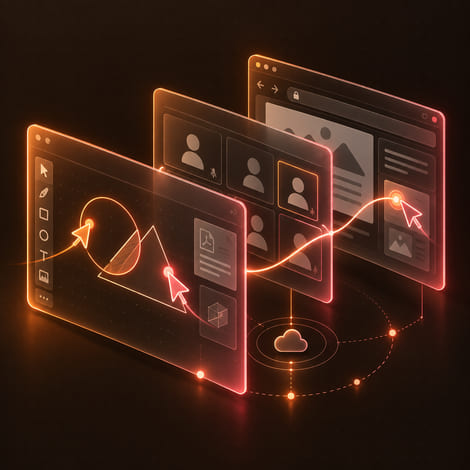
A live classroom where the whiteboard, the video, and the browser are all shared in real time.
- Client
- HappyDots
- Sector
- EdTech and online learning
- Our role
- Full platform design, build, and operation
- Status
- Live in production
The brief
What was breaking
Remote teaching on general-purpose video conferencing loses most of what makes a classroom work. You can see the student, but you cannot draw with them, hand them a document to annotate, or walk them through a website while they follow along. HappyDots needed the interaction, not just the call.
- Video conferencing alone gives you a talking head, not a shared workspace teachers can actually teach in.
- Annotating slides or PDFs meant screen sharing a static view that students could not participate in.
- Guiding a student through a website meant reading URLs aloud and hoping they were on the same page.
- Classroom latency and reliability requirements are stricter than a standard meeting call, where a dropped second is merely annoying.
What we built
The system we delivered
A collaborative whiteboard built on tldraw
Multiple participants draw and annotate at once with live multi-user cursors, and PDFs and PowerPoint files can be uploaded and marked up directly on the canvas.
WebRTC video built on LiveKit
High-quality video and audio with screen sharing and a grid layout for multiple participants, on infrastructure that scales with the class.
Synchronised co-browsing
Teachers navigate the web with students following in real time inside a controlled Hyperbeam session, with the teacher managing browsing permissions.
Conflict-free real-time sync
Concurrent edits are resolved and broadcast to every connected client through tldraw's sync core, so the canvas stays consistent no matter who draws first.
Roles, invitations, and session recovery
Session-based authentication separates teacher and student capabilities, invitations to a classroom are secure, and dropped connections rejoin automatically.
Built with
The stack behind it
The lead tier is what makes this system what it is. Everything under it is the platform that carries it.
AI and intelligence
Real time
Frontend
Backend
Security
What changed
The result in production
A classroom, not a video call
Drawing, annotation, presentation, and guided browsing happen in one live session instead of across three tools.
Concurrent editing that stays consistent
Conflict resolution and broadcast sync keep every participant's canvas identical while several people draw at once.
Built for the age group it serves
Role-based access, secure invitations, encrypted media, and moderation are part of the platform because the students are children.
Same problem?
Let's scope what this would look like for you
Start with a two-week Discovery Sprint. We map your highest-value workflows and deliver a prioritised pilot roadmap grounded in what we have already shipped.